Validation
Overview
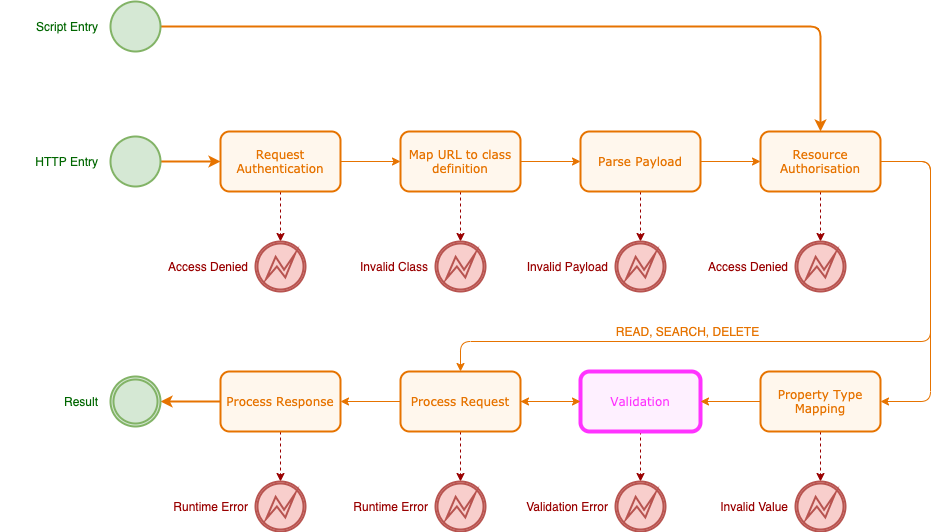
Validators are used on classes and on class properties to ensure that a value that is being assigned to a property or a set of properties is a valid value. It applies only to CREATE and UPDATE operations.
Several validators are included with the Appirator modules that anyone can import into their own applications and modules. The validators can be assigned as needed to class properties. Many take parameters so they can be customised. Any validator in declared any module that is a dependency within another module or application can be used by that module or application.
Validators can be declared globally within a module or application or they can be defined directly inline with the property they are validating. The inline approach makes sense if the validator does not need to be shared globally and only applies to the specific property.
Validation Phases
There are three validation phases, each intended to allow a deeper and more CPU or network intensive test on the value or values being assigned.
The validation phases are:
- EARLY. This is the first phase of validation to be run and is intended
to be the lightest. It should only contain direct checks on the value
being assigned or the presence of it. E.g.
NotEmpty,Rangeor the regexPatternvalidators available in the Appirator core module. - MID. This is the second phase of validation to be run and is intended to operate on the resource object once the previous version of the object has been loaded and merged with the new property data. Note that it is possible that the loading of the existing object has already occurred because this occurs through lazy loading, so any reference to a property that was not supplied in an UPDATE request will result in the existing object being loaded from its associated store and merged.
- LATE. This is the last phase of validation and is intended for heavy CPU validation or validation that might require extensive IO. An example of this is the testing of a unique value for a property where there is a large set of objects to query or when an external source needs to be checked.
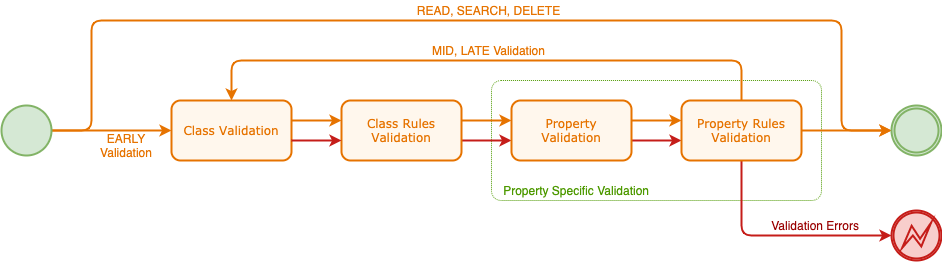
Validation is broken up into 4 steps:
- Class or object validation. This is performed where there are validation declarations on the class itself as opposed to a class property.
- Class or object rules validation. This is performed where there are validation declarations within a class-level rule where the rule selector matches the inbound request.
- Property validation. This is performed where there are validation declarations on class properties.
- Property rules validation. This is performed where there are validation declarations within class property rules where the rule selector matches the inbound request.
Property and property rules validation is only performed on properties that are being explicitly assigned through an HTTP request (PATCH or PUT) or where there has been an explicit change to the property via scripts. If a property is not being updated during an HTTP request or if the property is not modified in a script, then property validation for that property is not invoked. When properties have been modified through scripts, all modified properties, and the object itself, is validated as the object is saved.
All validation steps within a given validation phase are run through to their end irrespective of whether there are validation errors or along the way. Validation errors are collected and at the end of the phase and these are issued as a collection of validation errors to the caller. Note that the validation errors contain the name of the property, which allows client applications to highlight the failing field if desired.