Authentication & Authorisation
Overview
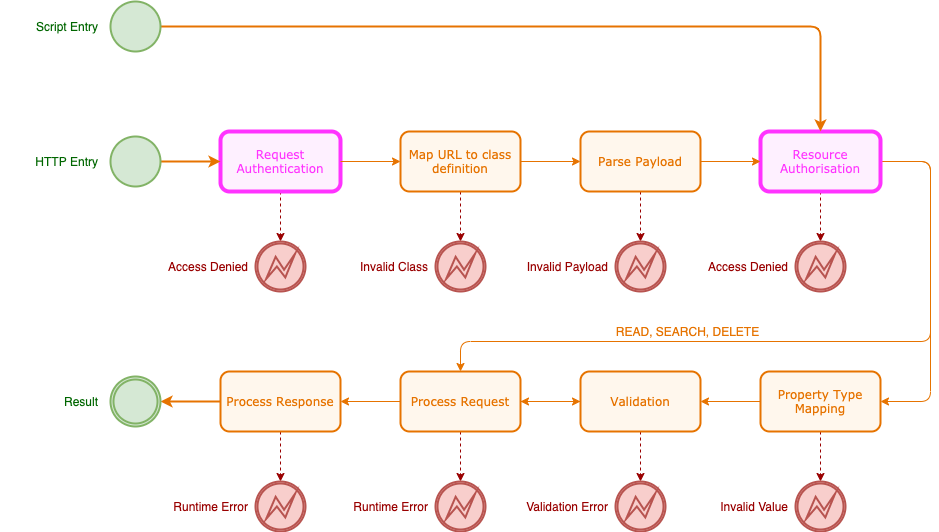
Appirator API endpoints and their associated classes can be entirely open to the world or they can be protected with a mix of authentication and authorisation logic.
Request authentication only happens on Appirator API HTTP endpoints. When resource objects are accessed or created within Appirator scripts, those requests are not HTTP requests and therefore they don’t undergo request authentication. The exception to this is when an Appirator application is accessing another Appirator application’s public API endpoints and the other application requires proof who the requester is.
The authorisation of the Appirator model occurs after request authentication and is based off access rules within the relevant resource classes or through permissions linked to the subject identified in the request authentication.
Subjects
Request authentication is the process by which an HTTP request is verified and trusted or rejected. The result of a successful request authentication is a subject, which is literally a JSON object representing a human or other actor that is accessing the API. In some cases there is no subject resulting from a request authentication, but in most cases there will be one.
The requesting subject may hold identifying information like the user’s name, email address and internal identifier. It should also have an accompanying set of permissions or roles which can be used to authorise the request.
If an HTTP request into an Appirator API does not result in a subject, the request can only be authorised through available request parameters such as headers and query string parameters.
The only reserved property on a subject is permissions which is a list of
resource permissions and each of these must adhere to the
resource permission format described in this document.
Authentication Tree
HTTP requests are authenticated using an authentication tree. This is a set of connected nodes that each have their own authentication logic behind them. The first node to be processed sits at the top of the tree. This node will run first and then invoke the next node and so on.
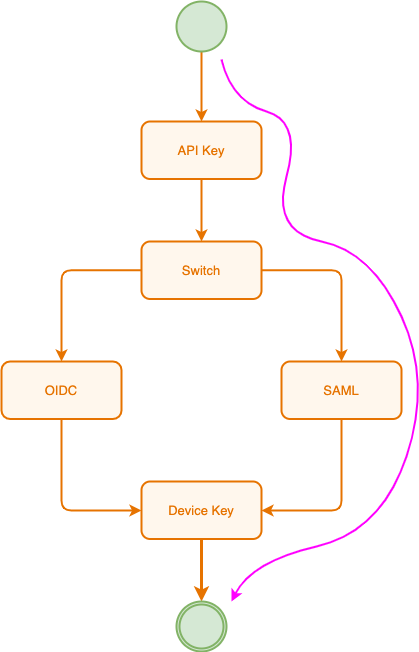
In the example above:
- The request authentication starts at the API Key check. If successful, it moves onto the next node which is a switch.
- A switch node allows branching within the sequence, which provides a mechanism for a tree to take on multiple authentication paths. In this case, it switches to the SAML branch.
- The SAML assertions are tested in this node and it is here that the subject is likely to be identified. If the subject has internal roles and permissions, these will be accessed during the authorisation phase. Alternatively, the subject can be assigned role directly from those present in the SAML token and these can be tested later within access rules.
- Once the SAML token check is successfully passed, the device key is tested, and if the associated device is not invalid or blocked, the request authentication completes successfully.
The authentication tree is highly customisable and scripts can be used to test individual parameters, token content or application data. Custom authenticators are also possible.
Authorisation
Authorisation is the process through which resource objects are tested for access. Access may be derived from one or more of the following:
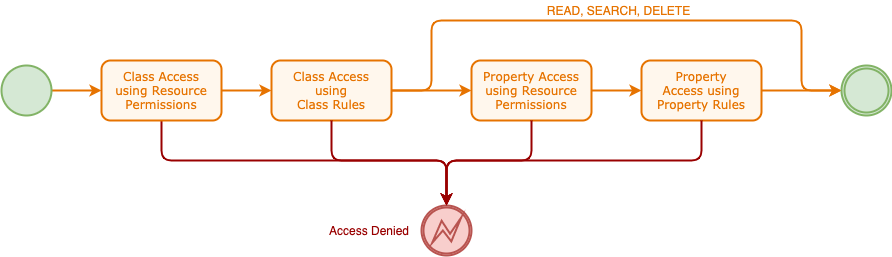
There are 4 phases in authorising access to a resource and these are shown in the diagram below.
TODO - how to provide access rules for the SEARCH operation - class authorisation may not be possible, but property authorisation should be
All requests undergo class authorisation using resource permissions where present and class access rules. In addition, CREATE and UPDATE operations are tested during property assignment using both resource permissions and class property access rules.
Roles
While roles are not internally part of the Appirator authorisation model, they
are typically the mechanism through which access is granted to API resources and they
can be used within the resource class and property access rules that are supported
by Appirator. Subjects have a reserved property called permissions
and they can have any custom property that developers choose to add to them.
It is possible, therefore, to add a property that holds roles for the subject and
these can be tested as needed within resrouce class or property access rules.
Resource Permissions
Resource permissions are used internally to authorise access to resource classes, their resource objects and the properties of those objects. These permissions apply automatically to resource authorisation without the need to include them in any resource class or property access rules.
Resource permissions contain the following properties:
Parent Matching
parent (array of string)- Zero or more operations. For any given resource object for which context values in this permission match, its parent object must also have a permission matching the request with a the same grant as this permission using one of the operations provided in this property. E.g. if this property is set to"READ"and the grant of this permission is ALLOW, then the parent of the resource object being assessed must have a matching permission that results in a grant of ALLOW using an operation of READ.
Context Matching
In order for the permission to match, all of the following properties must match the associated values of the applicable resource class. If a value is not supplied it acts as a wildcard.
module (string)- The module or application name in which the resource classes in theclassesproperty reside.classes (array of strings)- Zero or more resource class names. Note that these are matched using an instance-of test not a class name match. They are the full names excluding the module prefix.ids (array of strings)- Zero or more resource object identifiers. If these are present, the permission applies to specific resource object instances.properties (array of strings)- Zero or more property names from the resource classes. This is likely to be useful only if there is a single class name referenced in theclassesproperty.operations (array of strings)- Zero or more operation names.
Grant
grant (string)- The grant to apply, which can be either ALLOW or DENY. ALLOW is default. Both the parent and context values must match in order for this grant to be applied.
Values under ids, properties and operations can each be negated
by prefixing each entry with an exclamation mark. Any property that is an array of
strings, can be represented as a CSV.
When represented as a string, resource permissions take an urn-like format:
rp:<parent>:<module>:<classes>:<resource-ids>:<properties>:<operations>:<grant>
In this format, wildcards can be represented by having no value within the segment or by using an asterisk in the segment. Array properties can be CSVs or strings, e.g.
rp:READ:com.appirator.account:user.User::!password,*::ALLOW
Resource permissions that are more specific than other permissions, override
the grant from those that are less specific, e.g. rp:READ:com.appirator.account:::::ALLOW
is less specific than rp:READ:com.appirator.account:user.User::::DENY, so
while the first permission allows access to the entire com.appirator.account
module, the second permission denies access specifically to the user.User
class as well as resource objects of this class. If there is ambiguity in the
specificity of a permission, the more permissive grant applies, so ALLOW
always takes precedence over DENY if the specificity is effectively equivalent.
If multiple permissive permissions match the current context and one of these does not
have a parent condition, then the parent object permission is not tested because
the permission without he parent condition is already sufficient.
Resource Access Rules
Resource class access rules are used to authorise access to specific resource classes and their object instances under specific operations. If a request is not permitted as a result of either resource permissions or resource class access rules, then the request will be denied.
See access rules for more information.
Resource Property Access Rules
Resource class property access rules provide finer access control over specific properties of resource classes and their object instances. If the properties are being used with operations CREATE or UPDATE and the resulting grant is DENY, then the request will be denied. If they’re being used in READ or SEARCH and the resulting grant is DENY, then the properties will not be returned in the response - they’re effectively inaccessible properties.
See access rules for more information.