Development via Git
Description
While the Appirator console contains functionality that can be used for the development of Appirator modules and applications, it is considerably more flexible for developers to use their favourite IDE for Appirator development and to additionally link their Git repository to the associated module or application via the webhook functionality supported by the Git provider. Through webhook notifications, Appirator components can be built, and optionally published, with each push to a particular Git branch.
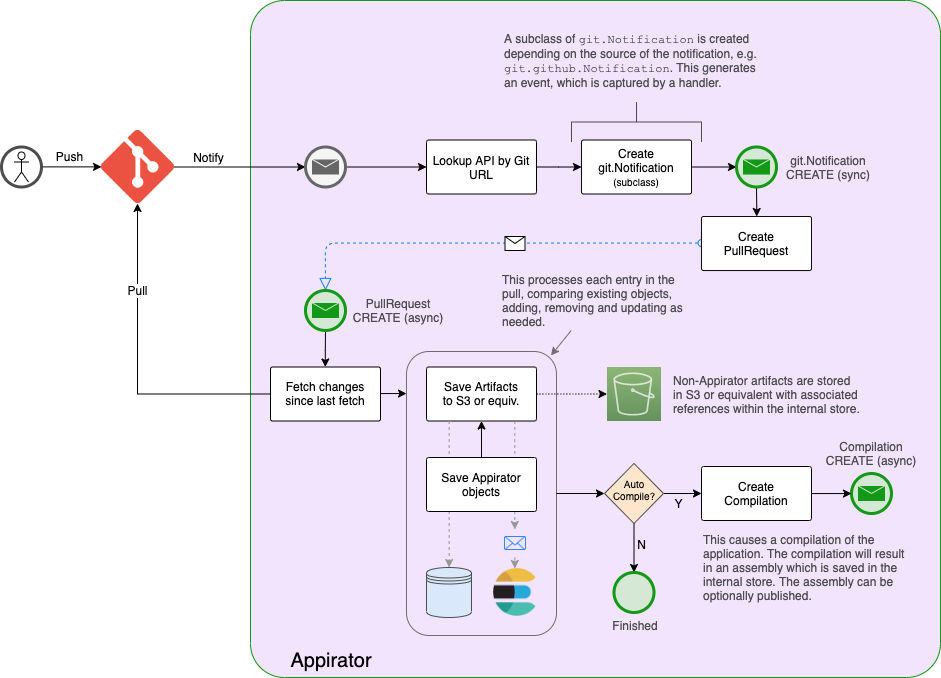
The Git compilation and publication is entirely constructed using Appirator components. These can be found in Appirator’s [TODO core module] under the git folder.
When the webhook notification is received, Appirator will create a PullRequest object which has an asynchronous CREATE handler that performs a pull of the repository. The files in the repository can be a mix of Appirator components and regular binary files. Appirator performs a pre-build of all components in the pull result and uploads the remainder to S3 or its equivalent depending on cloud provider. Providing the pre-build is successful, if the Git registration within Appirator has Automatic Compilation enabled, a Compilation object is created, which has an asynchronous CREATE handler the runs a compilation of the application. This will also optionally run all tests. The result is an assembly which is stored with the Compilation until it is published. Publishing the assembly can be made automatic if Automatic Publish has been enabled on the Git registration.
Project Structure
Git-managed Appirator projects should have the following structure.
<root>/
├── model/
│   ├── domain/
│   ├── media/
│   ├── log/
│   │   ├── Log.cls.yaml
│   │   ├── LogEntry.cls.yaml
│   │   └── LogLevel.lup.yaml
│   ├── NotEmpty.val.yaml
│   ├── Url.val.yaml
│   └── Version.val.yaml
├── scripts/
│   └── util/
│       ├── underscore-min.js
│       └── lodash-min.js
├── assets/
│   ├── glyphicons-halflings-regular.eot
│   ├── glyphicons-halflings-regular.svg
│   ├── glyphicons-halflings-regular.ttf
│   └── glyphicons-halflings-regular.woff
└── settings.yaml
There are three root directories per module or application:
model- this contains the classes, event handlers, etc. in the model.scripts- this contains the library scripts that are used by the objects in the model.assets- this contains additional files that are used in the model.
Model
Applications and modules contain a combination of the following types of objects:
- Classes - these are used as resource schemas, schemas for embedded objects, augmentation schemas and more.
- Lookups - these are used to restrict the value of a class property as well as the order in which those values can change.
- Event handlers - these are used to capture events that are triggered within the application or module.
- Validators - these are used to validate class property values.
- Stores - these are used to store or proxy resource data externally.
Collectively, the objects above are used to create the model for the application or module.
Within the project, sub directories are allowed in the model directory. Where
these are used, they form local package names and become part of the name of
the object. For example, the class Log in file /model/log/Log.cls.yaml has a
module-level class name of log.Log in this example and when the model is imported
into other modules, the Log class needs to be prefixed with module name. Given
that this is part of the Appirator core module which has a name of com.appirator.core,
the full class name of Log is com.appirator.core.log.Log.
Scripts
The library scripts under the project scripts directory can also contain sub directories. In ECMAScript, these files can be imported into inline scripts used within the model objects using the import keyword, for example:
import { map, reduce } from 'util/underscore';

...
Scripts from dependent modules can be referenced in the same way as the above without needing to prefix the path with the module name. In the case of ECMAScript, the import statement above will import the first matching file using the following search:
<current application or module>/util/underscore.mjs<current application or module>/util/underscore-min.mjs<current application or module>/util/underscore.js<current application or module>/util/underscore-min.js<dependent module>/util/underscore.mjs<dependent module>/util/underscore-min.mjs<dependent module>/util/underscore.js<dependent module>/util/underscore-min.js
If a specific file is present in multiple dependent modules, there is no guarantee which one will be found first if it is not found in the module or application project.
All script files are referenceable as Script instances within the application model and can be retrieved and manipulated through a resource search via the Appirator API.
Assets
Under the assets directory, there can also be sub directories. These files are used as binary objects that can be referenced within the model. These files can be used where regular binary objects need to be returned or referenced within API resources or where they need to be used internally within the application or model. Examples are, sample PDF templates, sample zip payloads, etc.
All asset files are referenceable as Artifact instances within the application model and can be retrieved and manipulated through a resource search via the Appirator API.
settings.yaml
The settings.yaml file is the object instance file for the module. It sits at the root of the project. It contains the module or application properties. Note that modules can have dynamic properties that are assignable through the Appirator API or via the Appirator admin console. These include environment specific properties. Dynamic properties cannot be configured through a Git repository that is mirrored with an Appirator project.