Binary Artifacts
The Appirator core module contains a resource class called Artifact, which contains
the logic needed for uploading files and binary artifacts into the cloud storage
that Appirator uses to store such artifacts. This storage might be AWS S3 or
the storage from another cloud provider depending on which provider the platform
is running on.
The Artifact class can be used or extended to provide customised handling of
file uploads and to link these uploaded objects into Appirator resource objects.
The Artifact instances consequently act as representative of the real object
within application data.
The diagram below shows how this linkage is maintained.
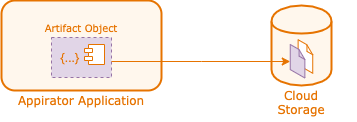
The resource object stored in Appirator’s store maintains a link to the object that has been uploaded to storage so that if the object is removed on either side resources are properly cleaned up.
The process for uploading an object is shown below.
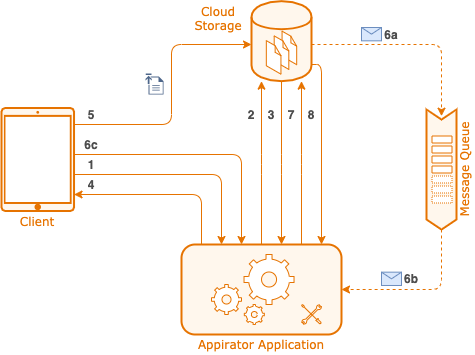
These steps are:
- The client creates the new artifact by posting its meta data to the Appirator application, e.g. the file name, content type, etc. But not its data.
- The application makes a request to the storage platform to reserve a URL for the object. This may actually just be an in-memory call within the Appirator platform depending on the storage platform used.
- The response is a dedicated URL to which the client should upload the object data.
- The signed upload URL is returned back to the client. At this point, the
Artifactis placed into a PENDING state (i.e. pending upload). - The client uploads the object data to the signed URL. This is normally done using an HTTP PUT.
- When the upload is complete, one of the following happens.
- 6a + 6b. A notification is placed onto a queue that is set up by Appirator to
receive object notifications. This notification is picked up by the
Artifactobject in the application. - 6c. Alternatively, the client updates the status of the
Artifactobject to COMPLETE.
- 6a + 6b. A notification is placed onto a queue that is set up by Appirator to
receive object notifications. This notification is picked up by the
- Irrespective how the complete notification is received by the
Artifactobject, the object then makes a request to the cloud storage platform to retrieve the object’s remaining metadata, e.g. MD5 and byte size. - The final metadata is returned back to Appirator and the
Artifactobject updated.
On subsequent requests of the Artifact object, the requestor will receive
all the artifact metadata as well as the final public URL of the object.